Claude Code / Editing skills
6 editing skills,
made in Claude.
Type /explainer, give it a clip and get a finished reel back. Claude reads what you say, picks the moment, plans the visuals around your words and renders it on your own computer. Free and open source.
You commented SKILLS. Here are all 6, how to install them in a few minutes, and what each one makes.
By Artem Novitckii · October 29, 2026
6 skills · MIT licensed · Runs on your Mac or Linux box
Install in a few minutes.
You need Claude Code, ffmpeg, Node and Python 3.9 or newer, plus a free Groq key for the transcripts. Run this in your terminal:
brew install ffmpeg node
export GROQ_API_KEY=gsk_...    # free at console.groq.com/keys
git clone https://github.com/artemnovitckii/claude-editing-skills.git ~/claude-editing-skills
cd ~/claude-editing-skills && ./install.sh
install.sh links the six skills into ~/.claude/skills/ so they show up as /trial-reels, /explainer and the rest, then runs the one-time setup: a Python environment, GSAP, HyperFrames and the cutout model. When I add new skills, git pull && ./install.sh picks them up.
Or as a Claude Code plugin
/plugin marketplace add artemnovitckii/claude-editing-skills
/plugin install editing-skills@claude-editing-skills
The skills are also packaged as a plugin. Plugin skills are namespaced, so you type /editing-skills:explainer. The git clone above is the route I've tested end to end.
The 6 skills.
Every example below came out of these skills, on one 55-second clip of me talking about carousels.
/trial-reels
One clip, three reels to test
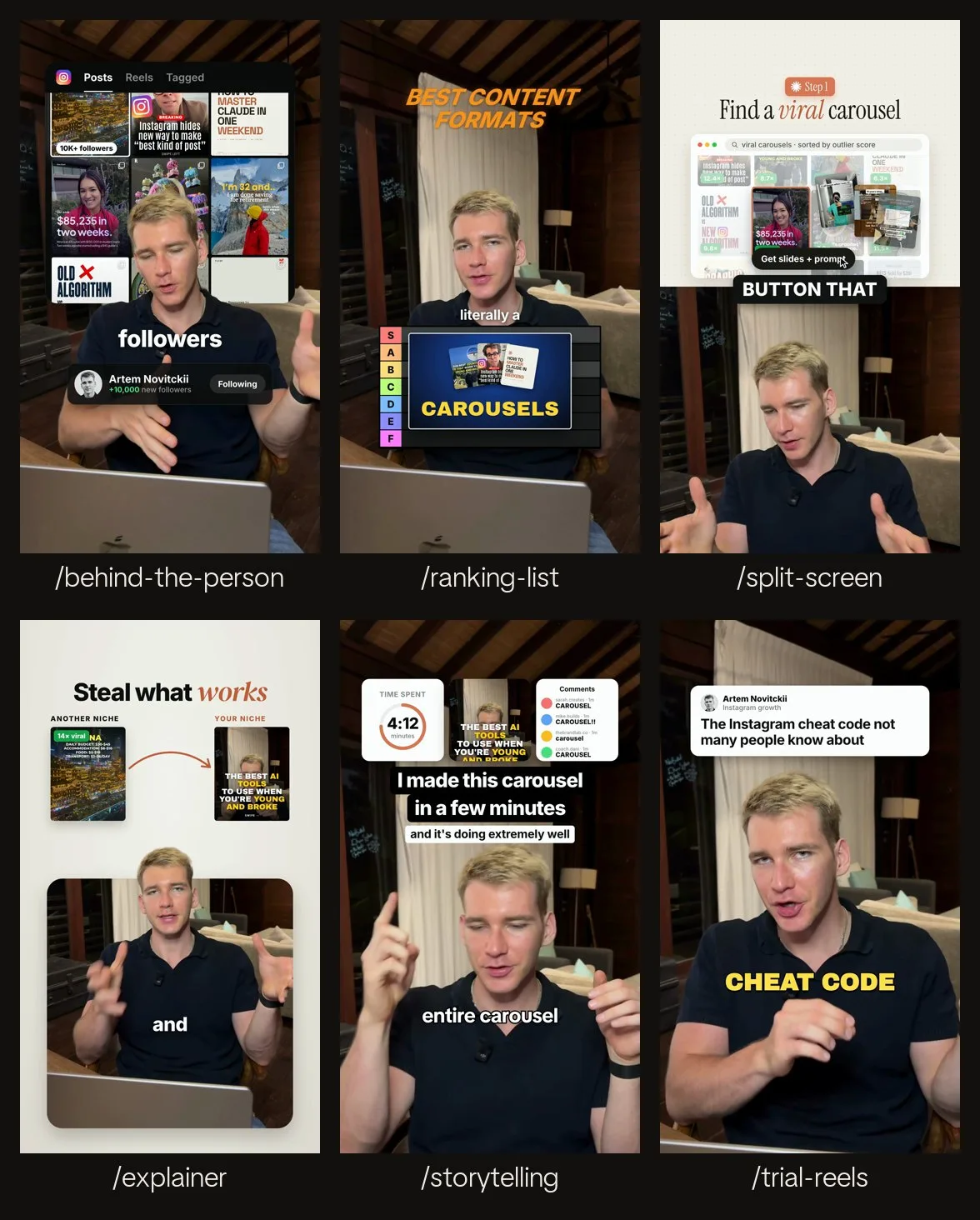
Turns one clip into three reels that look nothing alike, so you can post them as Instagram trial reels and keep the one that holds people.
- Version 1: a big yellow title with karaoke captions that turn white as you say each word.
- Version 2: a white post card with your hook as the headline, punch-in zooms on the key words and bold uppercase captions.
- Version 3: a dark grid backdrop, a pixel-font stat from your clip and the shot in an orange frame.
You bring: Just the clip, plus your profile photo for version 2.
/trial-reels ~/Downloads/my-reel.mp4 use the hook/behind-the-person
Graphics behind you
Cuts you out and puts a panel behind you: your post grid, a bar chart or a screenshot. Big words land on your chest as you say them, and a profile card counts the number up.
- The cutout runs on your computer at about a tenth of a second per frame.
- A grid can light up one post and swipe through its slides.
- The follow button flips to Following on the word you choose.
You bring: Your own posts, analytics or screenshots for the panel, or the numbers for a bar chart.
/behind-the-person ~/Downloads/clip.mp4, my posts are in ~/Desktop/posts/explainer
You at the bottom, visuals on top
Puts you low in a rounded panel on a light backdrop, with your head breaking out over its top edge. The top of the frame explains your point.
- Compare: a before card, an arrow that draws, then an after card that reveals itself. The cards can be images or just text.
- List: up to 4 numbered rows, each landing as you say it.
- Captions set your key words in a serif.
You bring: Nothing extra, though your own images make the compare cards land harder.
/explainer ~/Downloads/clip.mp4 pick the best moment/split-screen
The classic half and half
Visuals on the top half, you on the bottom half, and bold captions on the seam between them. Built for tutorial steps.
- A step badge and a serif headline.
- A window on top, with one of three visuals: a grid where a cursor picks one, clicks a button and fans out the slides; a screenshot that pans; or a checklist that ticks as you talk.
- The captions brighten word by word as you say them.
You bring: Your screenshots or images for the window, or nothing for the checklist.
/split-screen ~/Downloads/step-1.mp4/ranking-list
A tier list on your chest
Puts an S-to-F tier table on your chest. Each item pops up when you name it and drops into its row on your verdict. The captions sit just under your chin, never on your face.
- Items can be a fan of images, one image, an icon or just a name.
- You can rename the tiers (GOAT, MID, NO).
- On a close-up, the cards shrink so they stay out of Instagram's buttons.
You bring: Nothing, or images of the things you rank.
/ranking-list ~/Downloads/tier-list.mp4/storytelling
Three images, a title, a subtitle
Three simple cards across the top, a bold black-box title and a small white subtitle, all landing together over one continuous take. The captions are simple TikTok style: white with a black outline, 1 to 3 words at a time.
- Cards can be a photo, a carousel cover, a stat that counts up (like a 4:12 timer), real comments or a big number.
- Everything lands in the first third of a second.
- No jump cuts.
You bring: Your own photo or post for the middle card. Real comments only if you have them.
/storytelling ~/Downloads/story.mp4How it works.
Each skill is a set of instructions Claude follows plus a small renderer. You only talk to Claude.
- Claude transcribes your clip with word timings (Groq Whisper, free).
- It picks the stretch that fits the skill and looks at a frame to find your eyes and chin.
- It writes a small spec next to your clip. Every visual is anchored to a word you say, so it lands the moment you say it.
- It renders the reel on your computer with HyperFrames: 1080x1920, 30 fps, with your voice kept.
- It checks a contact sheet with Instagram's buttons marked in red, and fixes anything that sits under them or covers your face.
Make your own.
The repo is built so new skills are easy to add. I'll keep adding mine there.
skills/<name>/SKILL.md   what Claude follows: steps, the spec, taste rules
skills/<name>/build.py   spec -> HyperFrames composition -> mp4
kit/reel.py              clip prep, word timing, captions, render, checks
kit/cutout.py            the speaker cutout (RobustVideoMatting)
kit/transcribe.py        Groq Whisper with word timings
Copy any folder in skills/, change its build.py and run ./install.sh again. Or ask Claude: “make me a new skill in this repo that does X, built like the explainer.”
Get all 6 editing skills
Unlock the install line and all 6 skills, plus every other resource in the library. Free, one email a week, unsubscribe anytime.